
Bluebox at All Things Open 2026
Come meet the Bluebox team at All Things Open in Raleigh, NC, Monday and Tuesday, October 19th and 20th at the Raleigh Convention Center. It is the largest


In this post: we cover what the incident-to-fix loop looks like today, where it breaks down, and a full walkthrough of how Bluebox closes it from detection to validated fix. [Jump straight to the demo]
It's an all too familiar story. We ship a new release. Traffic picks up. And then it hits. Error rates spike, SLOs breach, and someone on the team opens their phone to a wall of alerts.
For most teams, what happens next is a familiar routine: manual investigation, diving through logs, forming theories, ruling them out, and forming new ones. With the addition of coding agents, someone tries to write a prompt detailed enough to explain the situation to their coding agent so it can help write a fix.
That last step is the one that's been bothering us at Bluebox. By the time a developer can explain an incident clearly enough (and with enough data from the investigation) for their coding agent to act on it, they've already done most of the hard work. The agent isn’t living up to its full potential; it’s being used just as a code generator for an answer the developer already found, and we're only scratching the surface of what's possible.
(Yes, more mature teams already have SRE agents handling that can correlate signals, surface anomalies, and narrow the blast radius. But even then, someone still has to carry those findings over to the coding agent that writes the fix. That handoff it still a bottleneck, and it’s completely avoidable.)
Bluebox closes it, not by replacing your SRE agent, but by working in collaboration with it. Bluebox brings its own independent investigation capability, using production telemetry to run causal root cause analysis investigation from the moment an incident is detected. And it connects those findings, whether they come from Bluebox's own analysis, a co-investigation with your SRE agent, or both, directly to as an evidence-backed fix plan (we currently support Claude Code and Kiro and are adding many more soon. Stay tuned!). No manual translation. No lost context. No copy and pasting telemetry. The loop from incident to fix closes, and the dev stays in control of the merge, not stuck in the middle doing translation work for the agent.
Let me show you what that actually looks like.
A new version just deployed. Trading opens for the day, traffic picks up and then error rates spike and SLOs start breaching. Users are hitting failures.
This is the moment most teams dread. Let's walk through what happens next with Bluebox in the loop.
And here's my demo app if you're curious: https://github.com/Dynatrace/easytrade
Bluebox continuously monitors your environment and automatically detects issues as they occur. The moment production signals degrade, it surfaces a finding, mapped to your services and codebase so you understand what's affected before you act.
On the Overview page, the finding appears immediately. One click on investigate and root cause analysis kicks off.
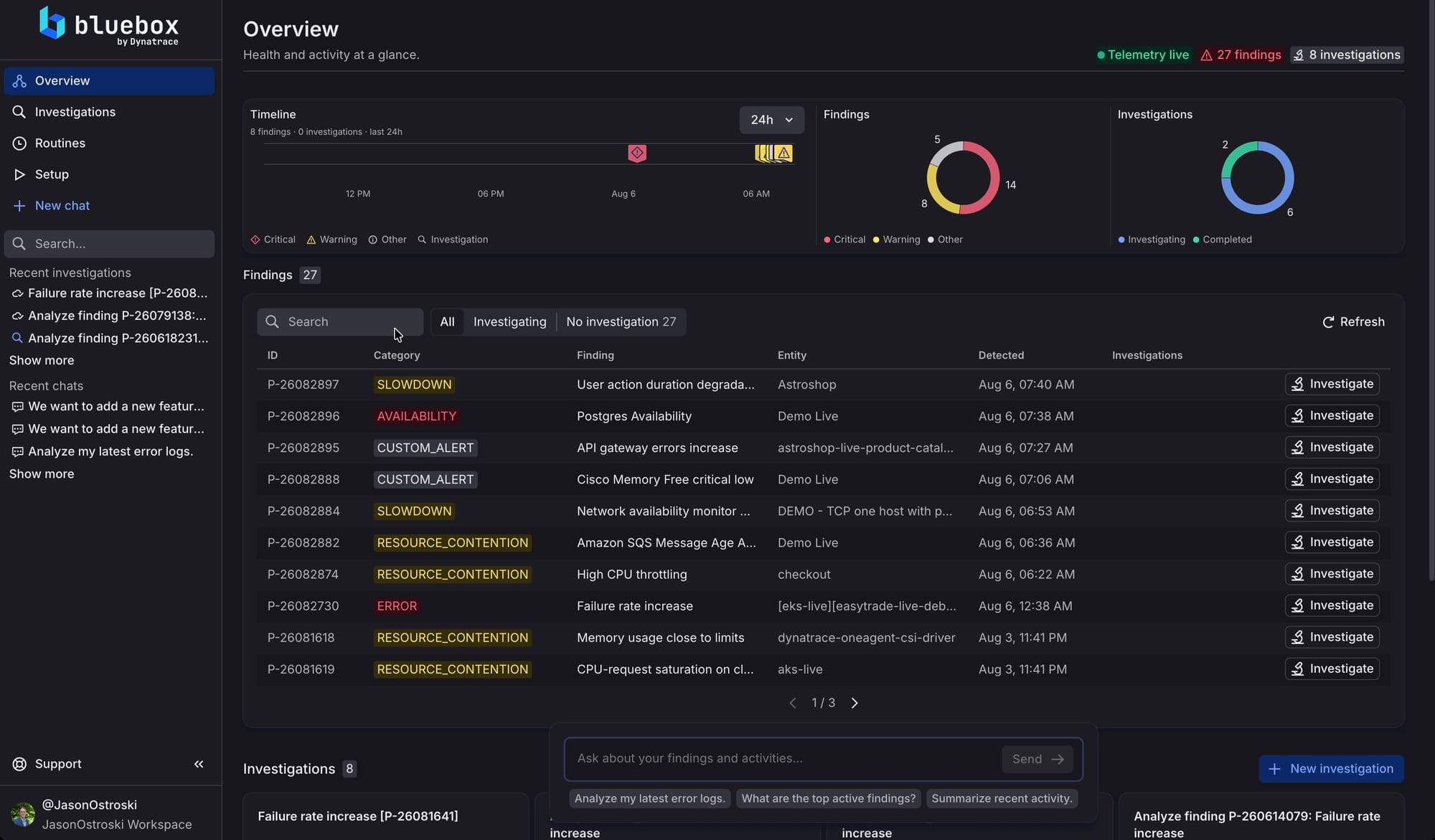
No dashboard to build, no alerts to configure. Bluebox placed the incident in context the moment it appeared.
Bluebox works through the problem end to end: gathering situational context, forming and testing hypotheses, and assembling evidence from your live telemetry. You can watch it analyze the finding in real time.
Bluebox investigation of a finding (animated)
The investigation traces the issue through your service topology looking at all your telemetry and code, tests each hypothesis against real signals, and follows the evidence to precise root cause.
When the investigation completes, Bluebox produces a structured, evidence-backed report including:
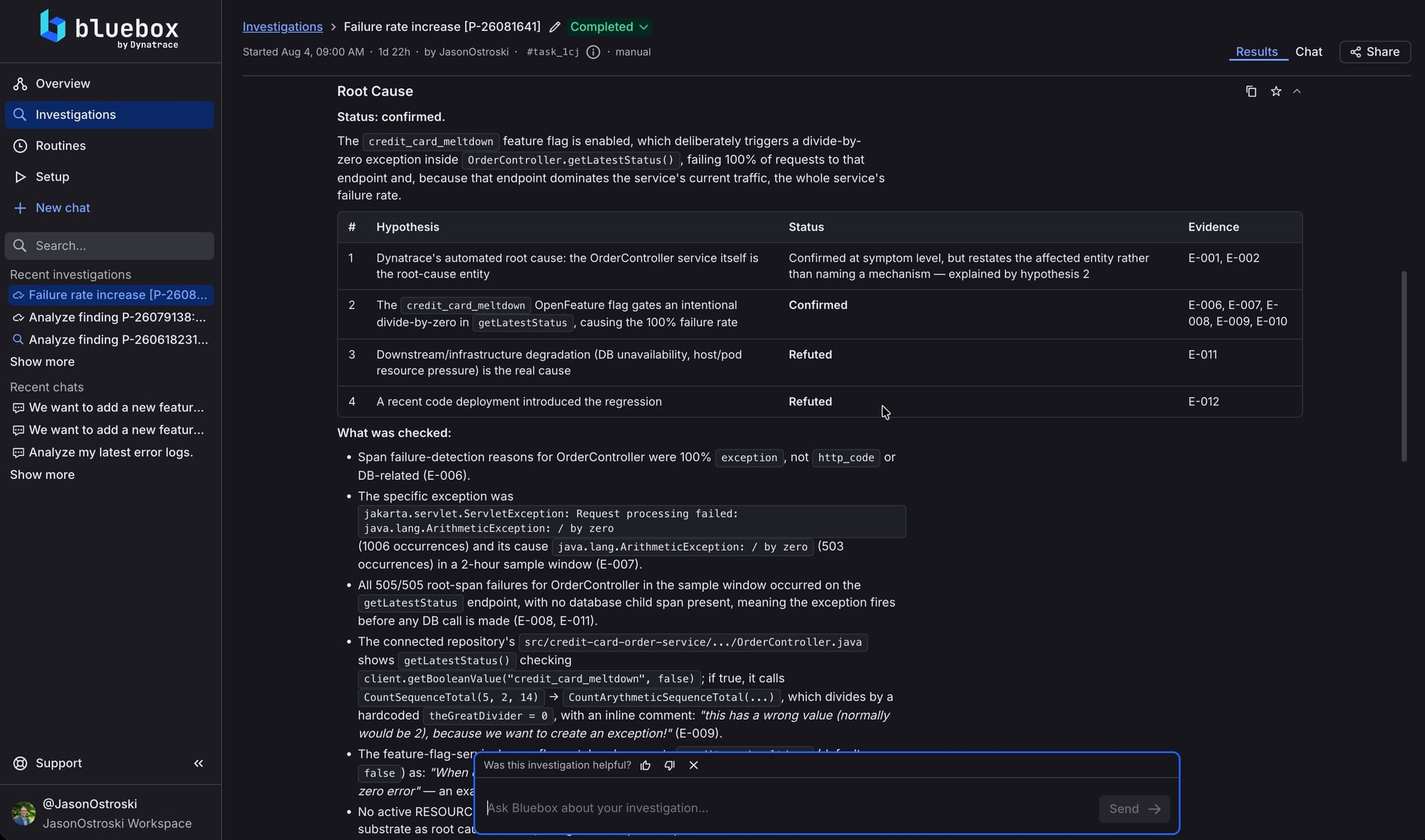
The finding in this case: a feature flag enabled in this deployment triggers an arithmetic error in the payment service. Every affected transaction traces back to the same code issue. Bluebox didn't guess at this, it followed the evidence and provides full reasoning so you’re working from answers you can trust.
Bluebox automatically files the investigation result directly as a GitHub Issue in your connected repository, so it lives where your team already works. Bluebox provides an evidence-backed plan to resolve it, everything the developer or coding agent needs to act on it is in one place, automatically, without anyone writing it up.
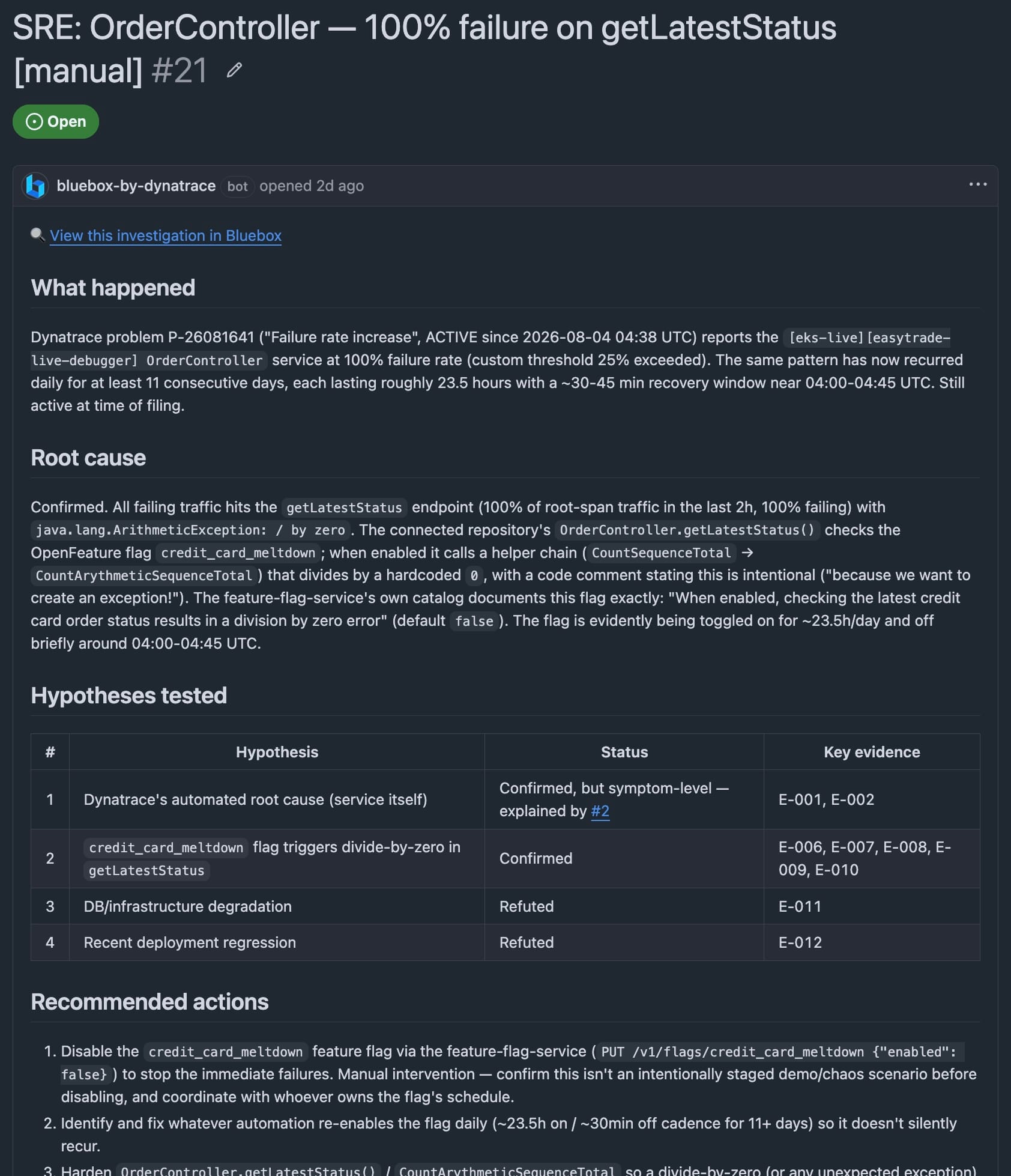
Now the coding agent picks it up. Instead of receiving someone’s best attempt to describe what went wrong and provide the relevant data, it gets the full investigation output including the actual code path, the evidence-backed, the blast radius. It has everything it needs to write a precise fix. Your coding agent also has direct access to all of the observability telemetry captured by Bluebox so it can pull additional details if needed.
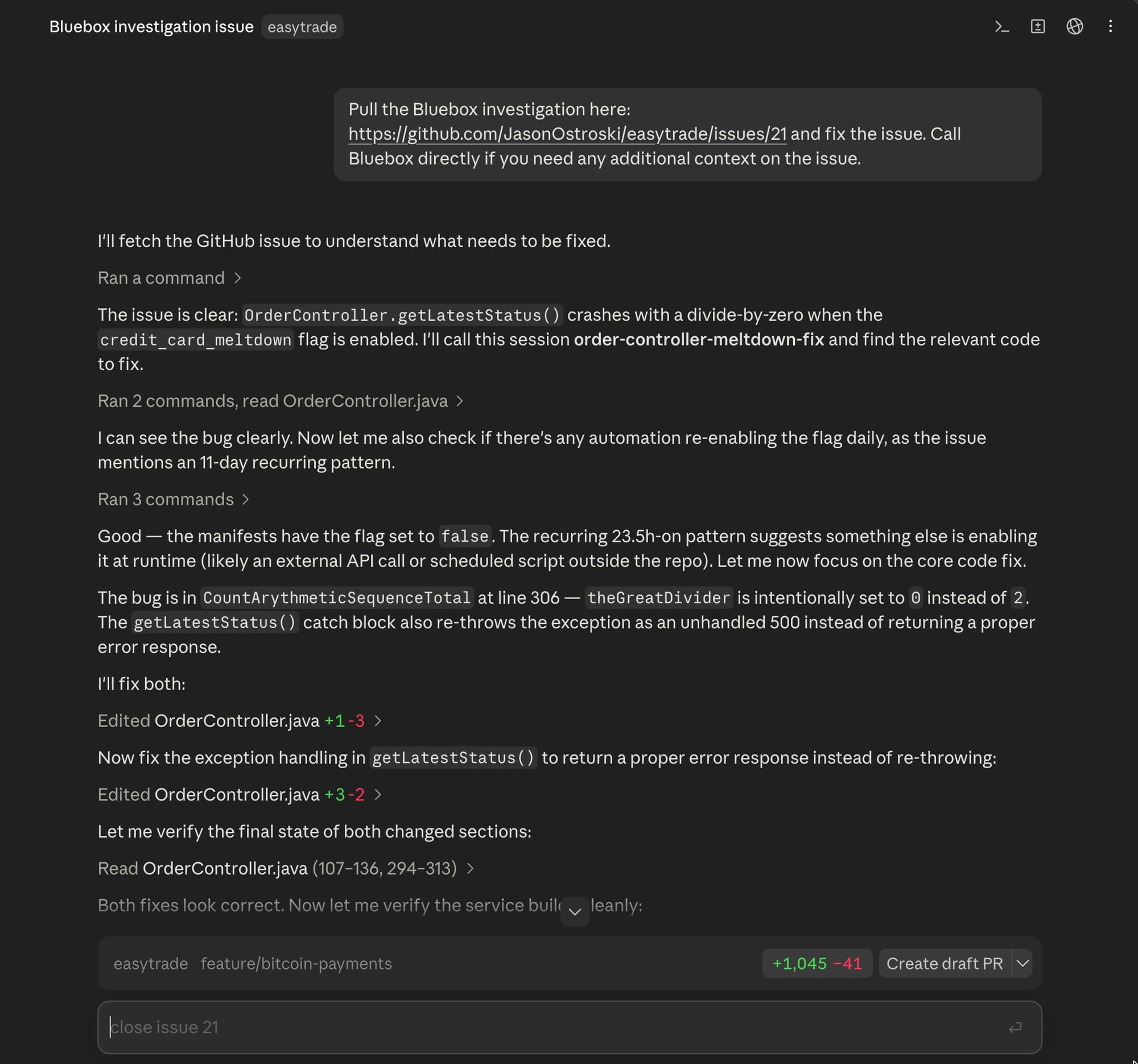
The developer reviews the PR and merges when they're ready. They're still in control. Bluebox never acts without their call.
After the merge, Bluebox doesn't just move on. It monitors the post-deploy behavior and confirms the fix held in production.
Error rates normalize. SLOs recover. The incident is closed. The whole loop, from detection to validated fix, without the developer manually investigating a single log.
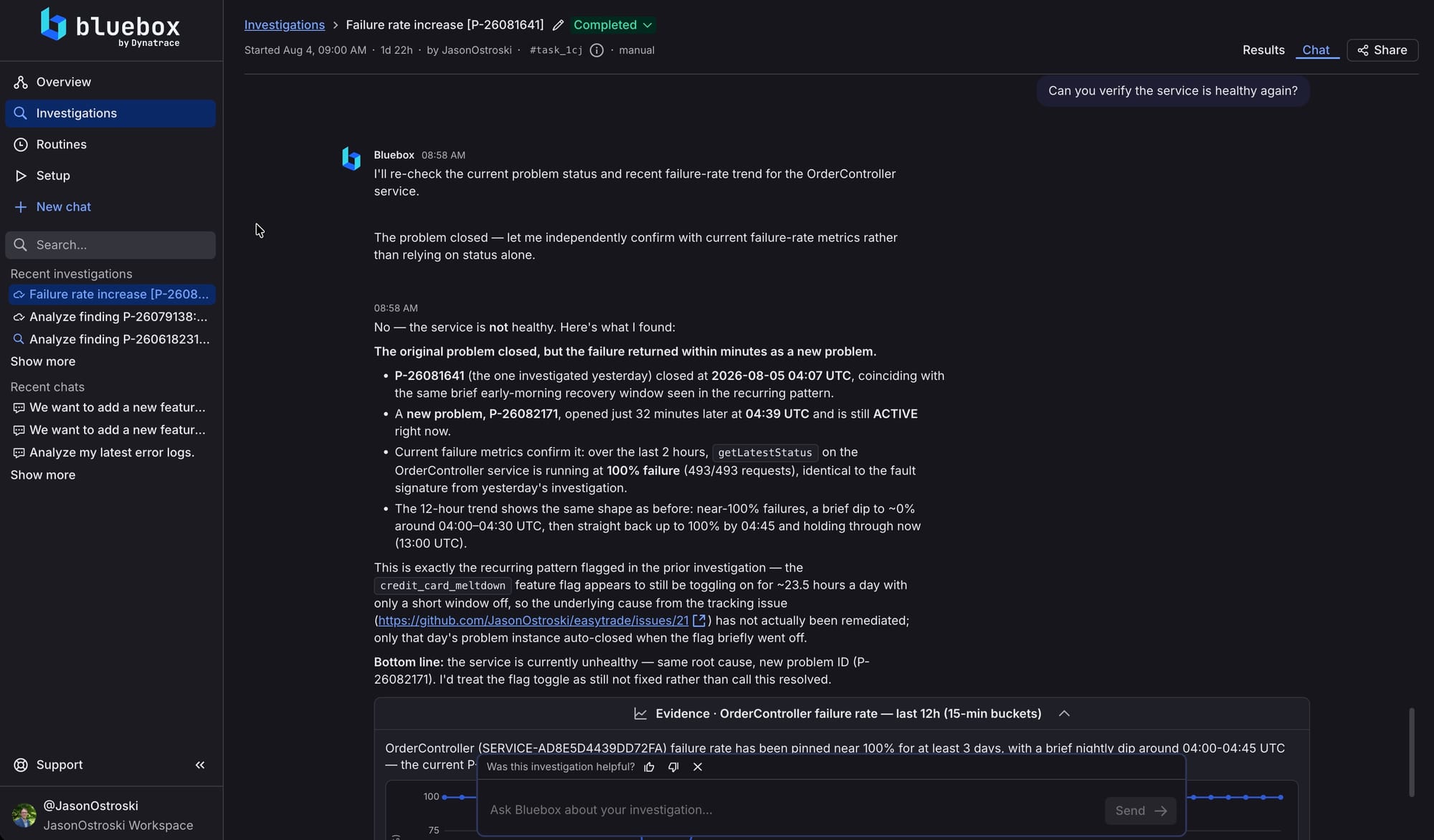
In my case, I have this problem reoccurring on a schedule. Bluebox isn’t overtly optimistic, it’s realistic and evidence-based. It didn’t actually just check if the specific problem closed, but it also checked if the key metrics for the service were healthy and it found that the problem keeps coming back!
The thing that’s so awesome about this loop isn't just the speed. It's the trust.
When your coding agent receives a vague description of a problem, the code it produces is only as reliable as your description. When it receives an evidence-backed fix plan grounded in production data, it's working from something solid. You get the right fix, and you’ve got confidence to merge it.
That matters more as teams ship more frequently. If you're merging multiple times a day with a coding agent, the ability to close incidents quickly and confidently, without hours of manual investigation, isn't a nice-to-have. It's what keeps that pace sustainable.
Come meet the Bluebox team at All Things Open in Raleigh, NC, Monday and Tuesday, October 19th and 20th at the Raleigh Convention Center. It is the largest
In this post: the questions Bluebox answers about a release, and the prompts to ask them. Then how we run them automatically in our own GitHub Actions pipeline,
The Bluebox MCP server is now available to everyone. Connect Claude Code, Cursor, Visual Studio Code, Kiro, Codex, or any other MCP client, and your coding agent can
